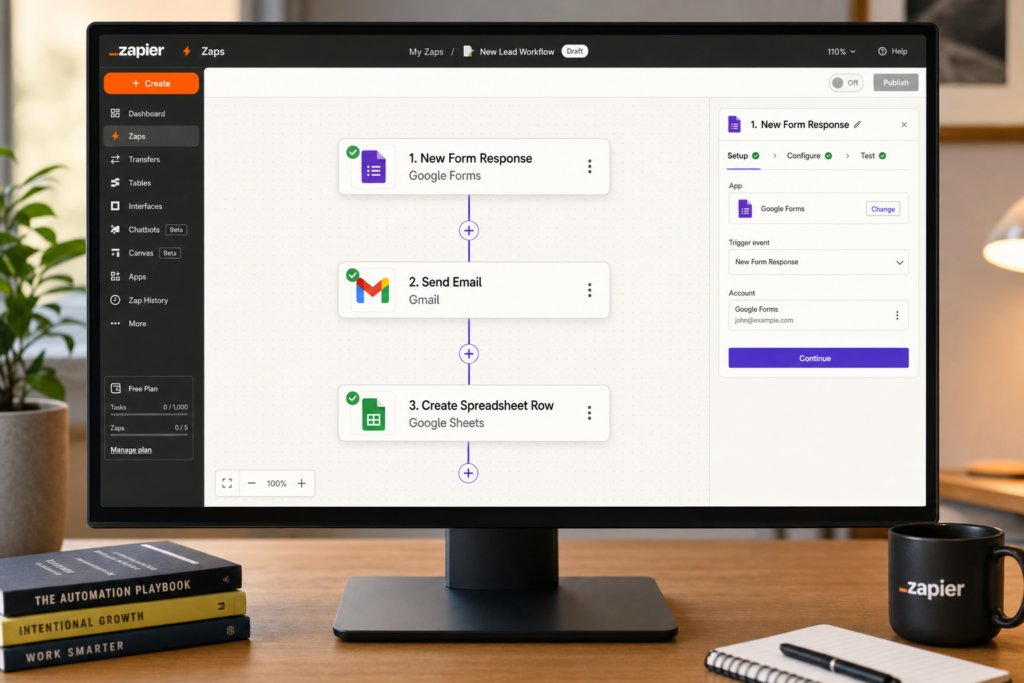
If you’ve ever caught yourself doing the same repetitive task for the tenth time — copying a form submission into a spreadsheet, sending the same “thanks for your order” message, or manually adding a new customer to your email list — there’s a good chance Zapier can do it for you automatically.
Zapier is a web-based automation platform that connects more than 6,000 apps. It lets you build automated workflows — called “Zaps” — that trigger an action in one app whenever something happens in another. No code required. If you can fill out a form, you can build a Zap.
What Is a “Zap”?
A Zap has two parts:
- Trigger: something that happens in App A (“a new form submission comes in,” “a payment is received,” “a new row is added to a spreadsheet”)
- Action: something Zapier automatically does in App B (“send an email,” “add a row to a Google Sheet,” “post a message in Slack”)
You set it up once, and it runs in the background every time the trigger fires. For a small business owner in Hilton Head Island, South Carolina who doesn’t have staff to handle every administrative detail, that can mean dozens of hours saved per month.
5 Starter Automations for Small Businesses
1. Contact Form → Email Notification + CRM
Trigger: A new form submission arrives in your contact form tool (Google Forms, Typeform, Gravity Forms, etc.).
Action: Zapier emails you the details instantly AND adds the contact to your CRM or email list (Mailchimp, HubSpot, etc.).
Why it matters: No more checking form inboxes manually or forgetting to add a lead to your list. The moment someone fills out a form on your hilton head island business’s website, the workflow handles it.
2. New Sale → Google Sheets Log
Trigger: A new sale or payment is processed in your payment tool (Stripe, Square, PayPal, WooCommerce).
Action: Zapier adds a row to a Google Sheet with the customer name, amount, date, and product.
Why it matters: You get a running sales log without ever opening your payment dashboard to copy data manually. Great for end-of-month reporting without an accountant on staff.
3. New Appointment → Reminder Email or Text
Trigger: A new appointment is booked in your scheduling tool (Calendly, Acuity, Google Calendar).
Action: Zapier sends the customer a confirmation email (or even an SMS via Twilio) with appointment details.
Why it matters: Reduces no-shows without you having to manually send reminder messages, which is especially valuable for service businesses in Hilton Head Island with a busy appointment calendar.
4. New Calendar Event → Slack (or Text) Alert
Trigger: A new event is added to your Google Calendar or Outlook Calendar.
Action: Zapier posts a message in your Slack workspace or sends you a text so you always see upcoming commitments.
Why it matters: If you manage a small team and want everyone notified of a new meeting or deadline without a flurry of forwarded calendar invites, this Zap handles it cleanly.
5. New Google Review → Saved to Spreadsheet
Trigger: A new review appears on your Google Business Profile (via a third-party review monitoring app that connects to Zapier, like Podium or Grade.us).
Action: Zapier logs the review text, rating, and date to a Google Sheet.
Why it matters: Builds a searchable archive of customer feedback you can review monthly to spot trends — without manually checking review platforms every day.
How to Get Started
Zapier’s free plan allows up to five single-step Zaps and 100 tasks per month — enough to test the concept with real workflows before committing. The Starter plan ($19.99/month billed annually) unlocks multi-step Zaps, filters, and more.
According to Zapier’s own automation guide for small businesses, the most common starting point for new users is connecting a contact form to an email notification — because it solves an immediate, visible problem and the result is obvious the first time it fires.
To build your first Zap:
- Go to zapier.com and create a free account
- Click “Create Zap”
- Search for your trigger app (e.g., “Google Forms”) and pick the trigger event (“New Response”)
- Connect your account and test the trigger
- Choose your action app (e.g., “Gmail”) and pick the action (“Send Email”)
- Map the fields — what data from the form goes into the email
- Test it, turn it on, and you’re done
Zapier’s official Help Center has step-by-step walkthroughs for every major app connection if you get stuck.
What About Zapier’s Competitors?
Zapier is the most widely used automation tool for small businesses, but it’s not the only option. Two worth knowing:
- Make.com (formerly Integromat) — More powerful for complex, multi-branch workflows. The interface is more visual but has a steeper learning curve. Free tier available.
- n8n — An open-source option that you can self-host if you want full control over your data. Best for technically inclined owners who don’t want to pay per task.
For most small business owners in Hilton Head Island, South Carolina who are just getting started, Zapier’s simplicity and massive app library make it the right first choice. Once you’ve outgrown its limits, Make.com is the natural next step.
The Bottom Line
Automation isn’t just for big companies with engineering teams. If your business runs on a handful of apps — a scheduling tool, a payment processor, a spreadsheet, an email list — Zapier can connect them in ways that quietly save you hours every week. The best automations are the ones you set up once and then stop thinking about entirely. That’s time you get back to spend on the parts of running your hilton head island business that actually require you.